Insta360 GO Ultra Review: Tested for Trail Running
We tested the Insta360 GO Ultra on Aussie trails to see how its mounts, stabilisation and battery perform for runners.
The Insta360 GO Ultra promises tiny size, wearable mounts and stabilised POV footage — but does it actually hold up on trail? We tested all it’s running attachments across rocky climbs, loose descents and everyday trail runs to find out what works best for trail runners.
Everyone’s starting to film their runs
Judging by the amount of trail run footage on our Instagram feed, it’s safe to say we’re filming our runs more than ever. And let’s be honest, who doesn’t love sharing their trail stoke on socials? It’s fun and to show our mates what trails we’ve enjoyed. Filming our runs can also be useful to check our running form (it certainly was for me).
This is where wearable action cameras come in. If you’ve been thinking about buying one, you probably already know the standout brands in this space, and Insta360 Go Ultra is right up there. It offers a heap of different bundles including one specific to running, with wearable magnetic mounts, stabilised POV capability and a detachable magnetic camera. And you can even get custom skins to really make it your own.
Sounds like it’s got the goods, right? So, the real question is whether it actually performs and lives up to the hype.
The Go Ultra — unboxed
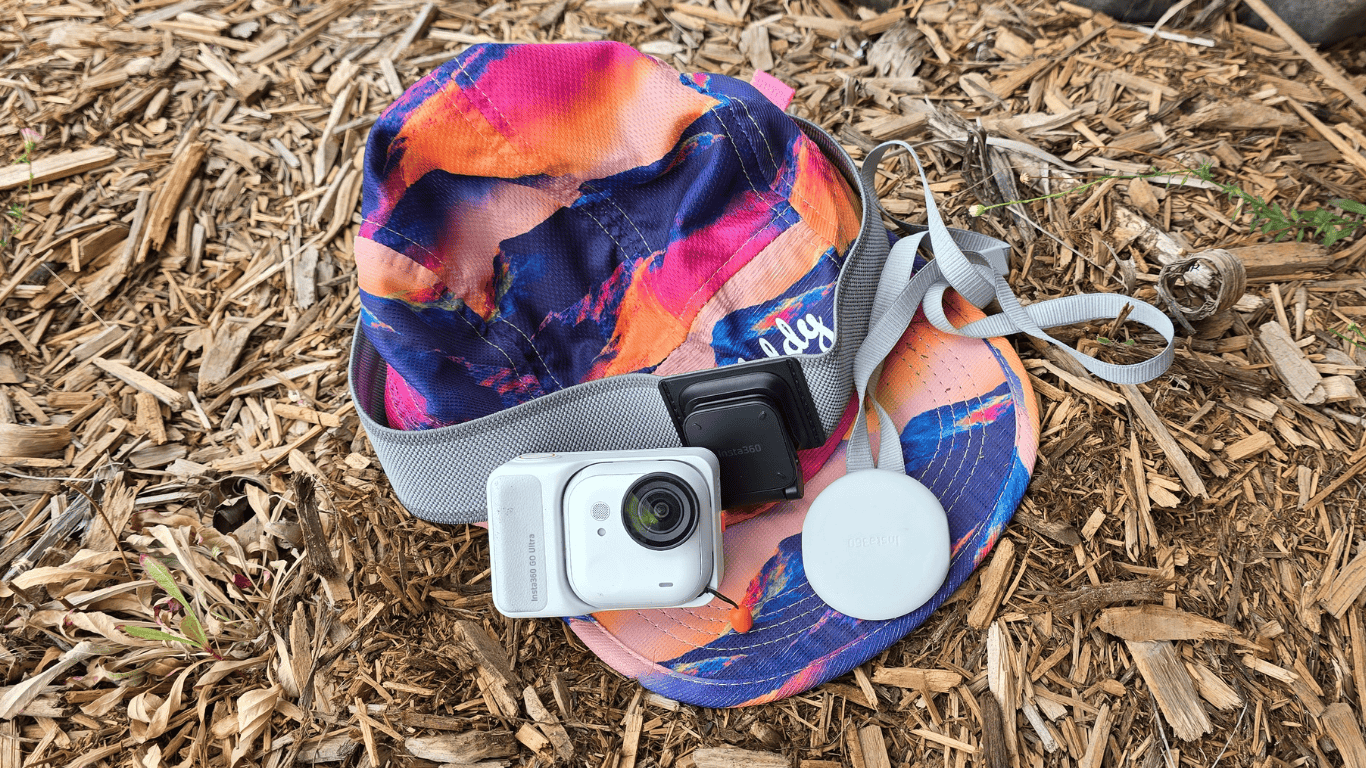
If presentation counts for anything, first impressions straight out of the box were schmick and honestly, I’m all for it. I received the Go Ultra running bundle in Arctic White, but it also comes in Midnight Black. Inside the box you get the standalone Go Ultra camera with a lens guard pre-installed on the camera, an Action Pod with a 2.5-inch touchscreen that houses the camera plus screen protectors, and a range of mounts geared toward hands-free wearable filming. These include a quick release cord and mount, a magnetic clip (I call it a hat clip), hat strap/headband, a magnet pendant (necklace mount), and backpack strap mount.
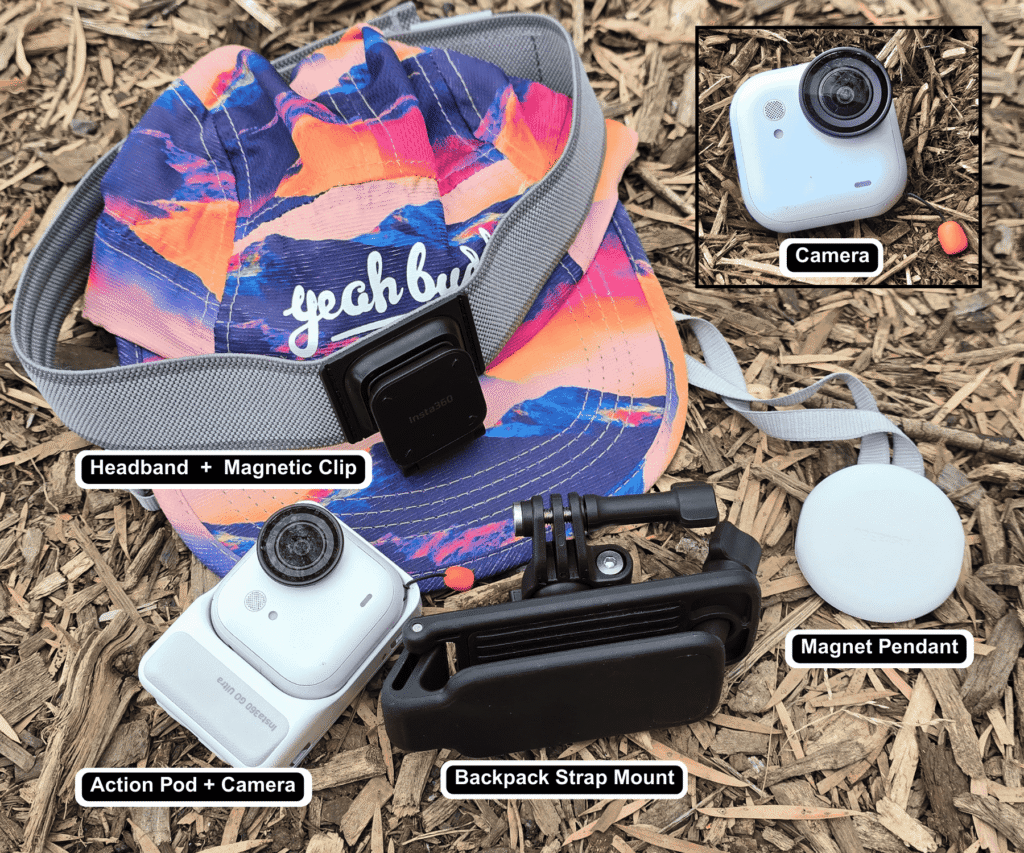
The runner bundle has everything you need except a selfie stick, presumably because it’s going for the full POV hands-free experience (which is understandable). But if running with a selfie stick is a must have for you, then a Go Ultra stick is available separately. For testing I snatched an Insta360 X5 invisible selfie stick from a colleague. Good news is, it works interchangeably between the two models.
The lens protector being pre-installed on the camera is a welcome bonus. I accidentally dropped my camera face down onto a rock during a fall. The guard ended up with a small scratch, but the lens itself was fine. Seriously, I’ll take a small cosmetic mark over cracking the actual lens any day of the week.
The included screen protectors are another small but appreciated touch for trail use, because let’s face it, we’re going to scratch the screen too at some point.
First Impressions
Size and weight
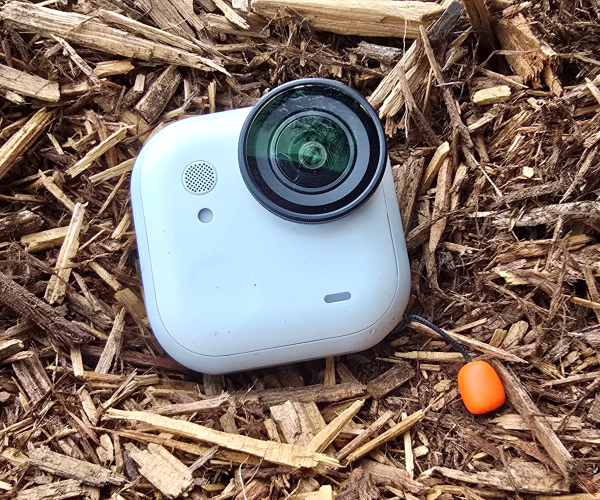
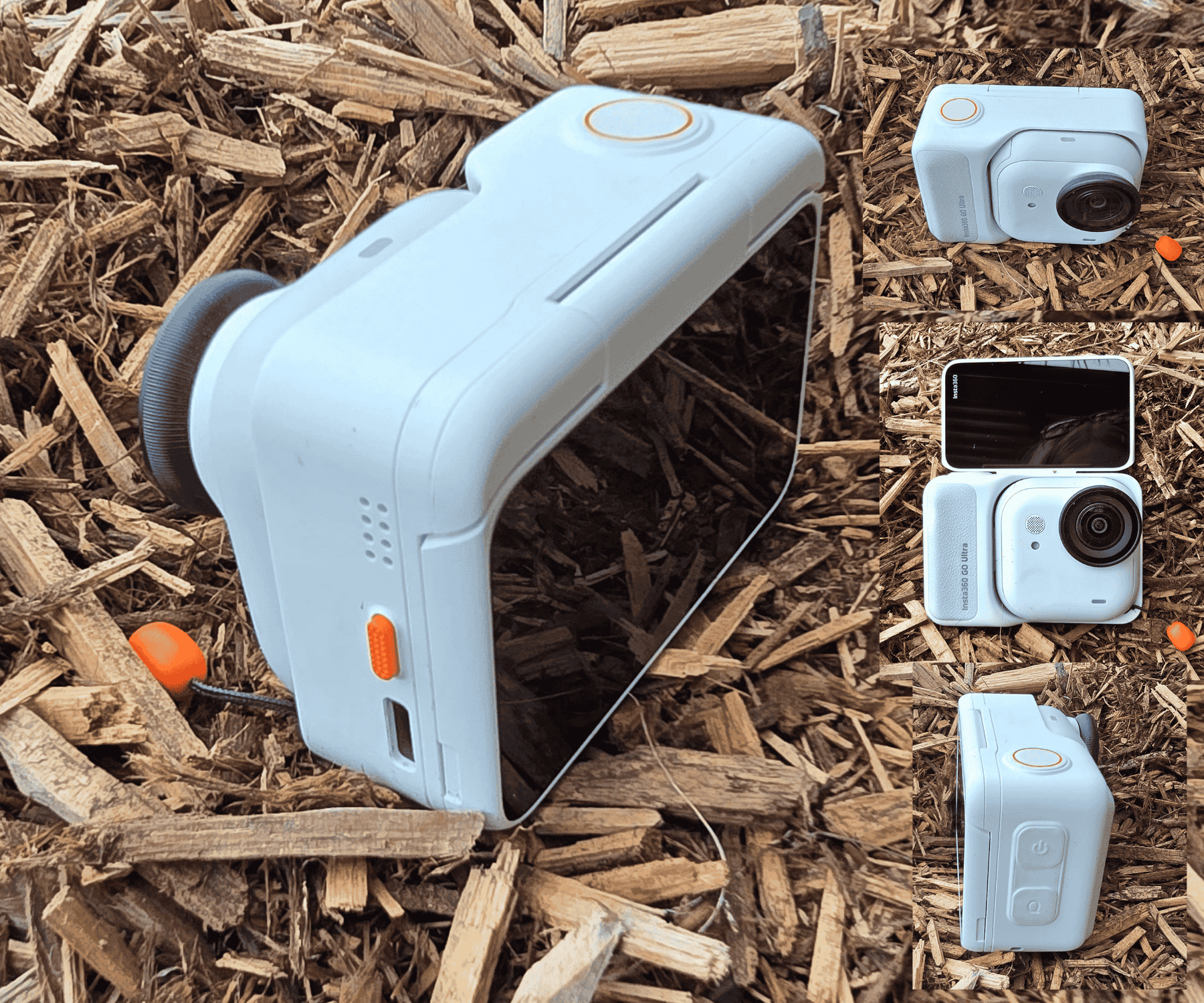
First up, the Go Ultra standalone camera is a tiny pocket rocket. At just 53g it feels light and easy-peasy to take on the trail but still big enough that I didn’t lose it down the rabbit holes of my backpack. When attached inside the action pod it’s still surprisingly light and portable, which matters when you’re already carrying a backpack or running vest with hydration, nutrition and the rest of your kit.
Design and feel
The Insta360 Go Ultra has a rounded soft-touch finish which makes it sit naturally in your hand. Build-wise, the entire ensemble (standalone camera and the action pod) have soft corners with no superfluous design features. In other words, what’s there is meant to be there.
Best of all, despite the light weight it doesn’t feel fragile. It feels tough as a tonka, easy to grip and makes you want to go use it — now.
The learning curve
Being blunt, there is a small learning curve for people who’ve never used a wearable action camera before (timidly raises hand). Out of the box it looked a bit daunting because there were so many attachments with bits and pieces. I was determined not to get my 20-something adventurous and tech-savvy son to set it up for me. Where’s the fun in that? So, after a couple of short 5-minute tutorials via the Insta360 app and a bit of practice, everything clicked quickly. Believe me when I say, if I can set this up and use it like I’ve been doing, anyone can.
But even so, if you’re a complete newbie, expect a short phase of “how do I turn it on again” and “where’s the thingo to do that?”. It’s inevitable. Anyone who’s used wearable cameras before will be totally fine.
Most of the features become intuitive once you know your way around the camera.
How we tested it
The testing happened during actual trail runs across:
- Rocky ascents and descents
- Loose gravel ascents and descents
- Fire roads
- Scraggly singletrack, flat and not so flat
- Forest sections and open trail
I also varied my pace: jogging, surging, climbing and descending, falling (I’m not joking). Some of the footage is on our Instagram page @trailrunmag and loads more will also be uploaded to our You Tube page soon.
The running attachments and mounts
Hat strap + hat clip
This was the surprising winner for trail running. The strap secures around your hat with strong Velcro and has a section at the front where the separate hat clip attaches. It’s a bit tricky to attach at first, but you eventually get the hang of it. The standalone camera then magnetically connects to the front of the clip. I was worried it would fall off, but it didn’t budge.
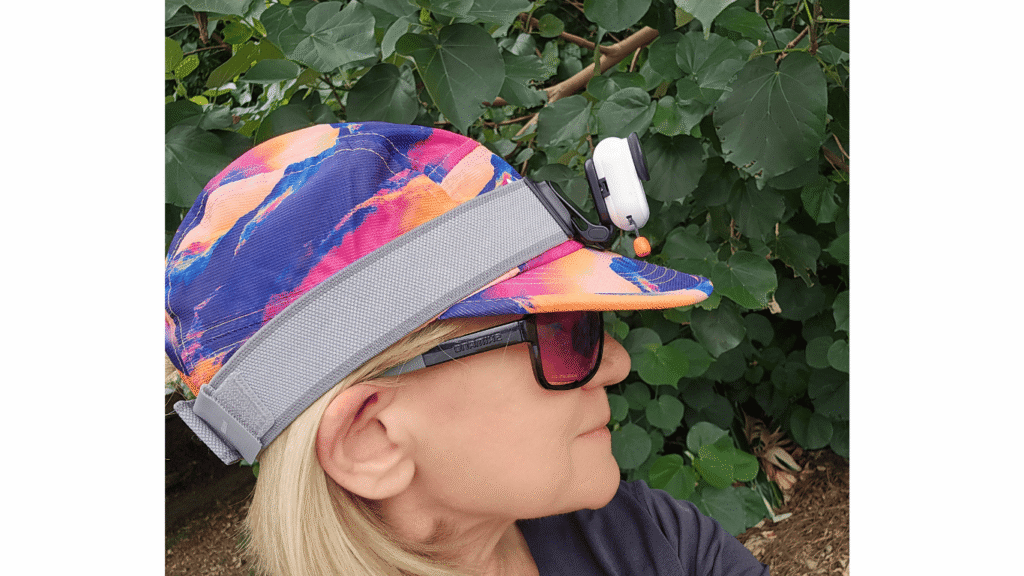
The front of the clip pivots so the camera can point in various angles, up and down, depending on what height you want to shoot (ie lower down ground level vs higher chest, sky or head level). You can also use it without a hat if you want to look like a 1970’s tennis player!
The good
- Once the strap is secured properly, it feels comfortable and after a few minutes you’ll forget you’re wearing it
- The weight of the camera is centred back on the strongest part of the cap, which reduced bounce significantly
- The footage obtained from this attachment was more stable and less bouncy than the other attachment footage (testing with 4K/30 and 4K/60)
- The camera easily fastens to the magnetic side of the hat clip and doesn’t come off easily
- When its time to remove it, a fair bit of force is needed, which is reassuring when running on trails
The not so good
- If you have to remove your hat mid-run, you also remove the hat strap and camera. This involves replacing it and re-adjusting it when putting it back on, otherwise your POV angle shifts slightly. Very minor annoyance, but worth noting
- You need to get used to where and how to turn the standalone camera on blindly because you can’t see it when it’s on your head. So, practice a few times before you go out, otherwise you need to keep removing the hat and strap to check whether the camera is on
Pro tip – activate the Quick Capture feature to make turning the camera on and off simpler.
This is a short snip of footage taken using the hatstrap.
Verdict
The velcro hat strap and attachment is the optimal trail running attachment.
Hat clip only (attached to running cap peak or back strap)
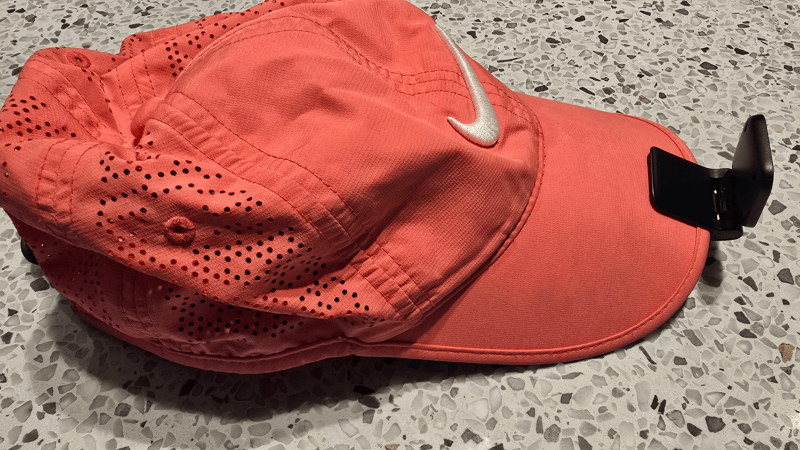
You can use the hat clip on its own without the hat strap by sliding it on the peak of your running cap or on the back strap. If you attach it to the front peak, you need to use a strong structured cap to make this work for trail running (think American baseball or trucker cap). When I used it, the weight of the hat
The good
- If you have a suitable cap, this is a very easy attachment to use to get footage
- Otherwise, good for walking, hiking or anything non-bouncy
- Simple to put on and take it off, requiring no adjustment to the hat clip
- The hat clip can also be attached to other types of straps and used during other activities too, eg: taking dogs for a walk
The not so good
- Although the weight of the standalone camera and clip is light, it’s still heavier than most light-weight caps we all use, which are designed to be breathable and barely-there. So on the trails, the hat and camera bounce up and down while running and the hat feels front heavy
- This means you have to hold onto the hat while you run which is annoying and not sustainable for a long run
- The footage is less stable, even with 4K/60
Verdict
Not recommended unless you have an old-school heavy duty structured peak cap or you wear it on the back strap of the cap.
Magnet pendant (magnetic necklace)
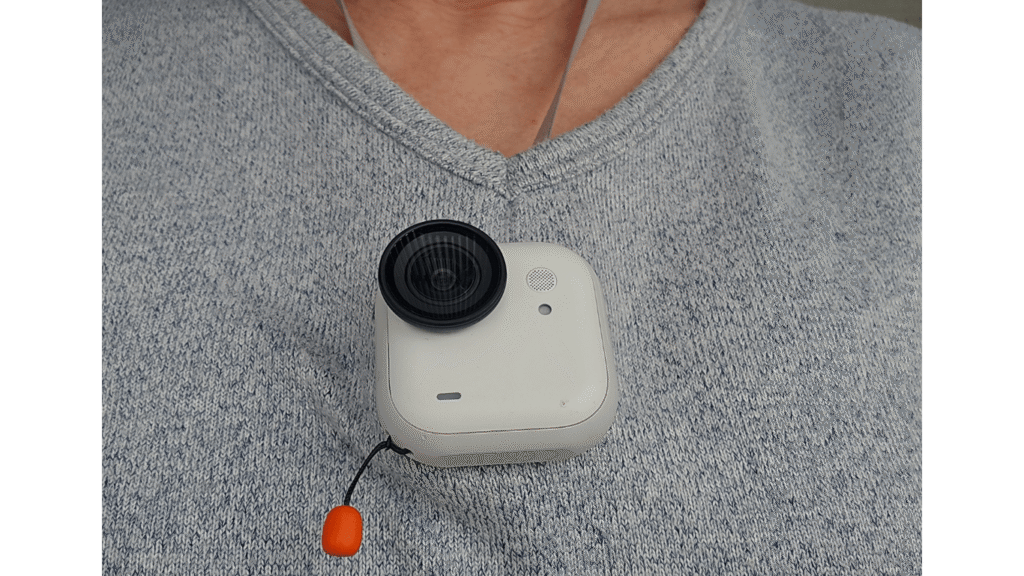
This attachment is a magnetic pendant that sits under your clothes and securely attaches the standalone camera from the outside. It gives you a chest-level POV angle without needing straps or clips and has two ever so slight variations in angle to choose from (you just twist the back of the pendant to change POV).
The good
- Very easy to use and see when the camera is on
- It has two settings for POV footage depending on the type of view you want (higher or lower)
- Adjustable depending on the length you need
- The magnet is very strong and camera always felt securely attached, even when running rough shod over rocks, descending or trying not to fall
The not so good
- The magnet moves separately from the body, so the footage was bouncy, even at 4K/60 (see video)
- A bit clunky to use with a running vest because it must be placed either above or below the front opening hooks which wasn’t always the optimal placement for the camera
- It also felt uncomfortable to have the camera positioned inside the opening of the vest
- Sometimes the vest could be seen in the footage
This is a short snip of footage taken using the magnet pendant.
Verdict
The magnetic pendant is probably better suited to walking, hiking, cycling or casual use.
Backpack strap
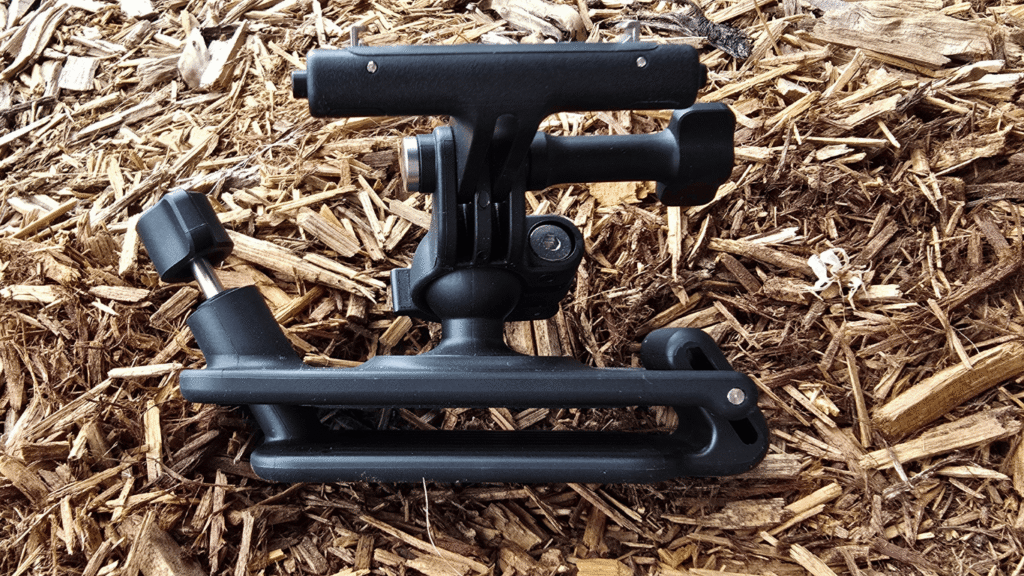
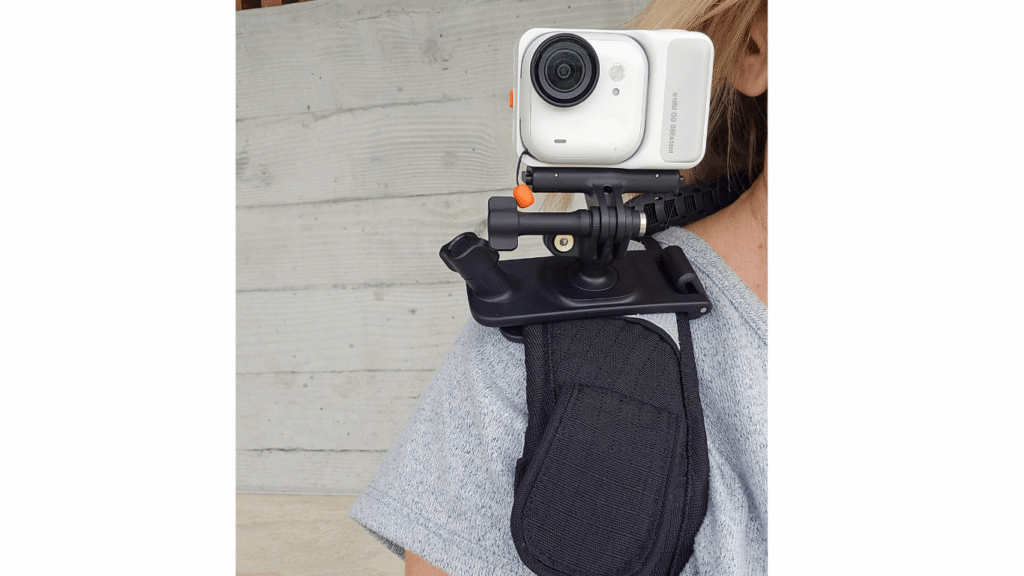
This is the last place I would have put a camera mount, but it makes so much sense. The backpack strap mount attaches to the shoulder strap of a backpack (you could also attach it to your running vest) to shoot POV footage. The camera has to sit inside the Action Pod for this one, and magnetically clicks into the mount. The mount includes a small swivel ball so you can fine-tune for the best viewing angle. It captures a forward-facing POV without needing anything on your head or chest.
The good
- Very stable footage for runners and is comparable to the hat strap
- Once the mount is attached to your pack, clipping the camera on and off is super quick and simple
- Secure locking system. It won’t detach accidentally
- Comfortable; set and forget
- A must-have if you’re using poles; no need to adjust anything
- Adjustable viewing angle using the swivel ball joint
The not so good
- Requires the Action Pod rather than the tiny standalone camera, but the weight wasn’t an issue during testing
- Some runners may not like having the camera visible on the front strap
- Best to set the mount up before you leave rather than mid-run
Verdict
A surprisingly strong option for trail running. Stable, secure and comfortable once set up, and one of the better mounts for hands-free POV footage.
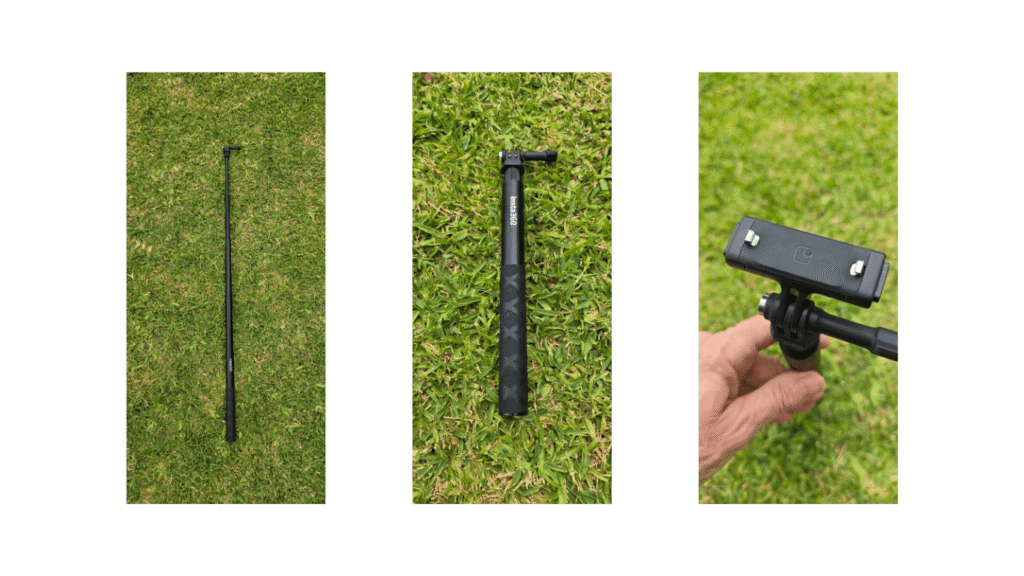
Selfie stick (borrowed Insta360 X5 invisible selfie stick)
Although not part of the standard running bundle (for obvious reasons), I tested the Go Ultra with a borrowed Insta360 X5 invisible selfie stick to see if it’s worthy of including in our trail run kit. The Go Ultra isn’t a 360-degree camera, so the stick doesn’t “disappear” from footage the way it’s designed to with 360 models, but it’s still good for creative angles and extended reach shots while running or walking.
The good
- Interchangeable with Insta360 accessories and no extra adapters needed
- Great for creative angles like shoe shots, side-body footage or scenic pan
- Lightweight and extendable, so easy to carry for short periods
- Quick to set up and adjust mid-run if you want a different angle and can be stored in your backpack or back of your running vest
The not so good
- Not designed specifically for the Go Ultra, so it felt slightly mismatched in length and balance
- Stick remains visible in footage since the Go Ultra isn’t a 360 camera
- Holding it while running isn’t practical
- Footage can feel a bit close or awkward if not extended properly
Verdict
Useful for occasional creative shots or short segments, but not something most trail runners will want to carry for an entire run.
POV footage & stabilisation
The Go Ultra isn’t a 360 degree camera, but it’s big sister the X5 is. Did I miss not having 360? Not really.
From my non-photographer’s eye, the footage held up well overall — clear, stable and more than good enough for trail clips and social posts. I did notice a slight dip in clarity in low-light situations, although that could partly come down to my limited videography skills rather than the camera itself.
The stability definitely varied depending on the attachment I used. The hat strap and back pack were the standout attachments and produced less bounce than the pendant or the hat clip on its own when trail running.
When using the hat strap and the backpack mount, the horizon stayed fairly level rather than tilting, which helped the footage feel more watchable.
Overall, the footage was better than I expected and I will continue to use the Go Ultra for socials.
Audio Quality
I never thought I’d enjoy hearing my own heavy breathing and footsteps in video, but the clarity had me feeling every step like I was still out there. The natural sounds feel immersive and don’t overpower the footage, and I actually preferred leaving the trail audio in rather than overlaying music.
Wind performance wasn’t tested, so that remains a question mark.
Ease of use mid-run
The camera detaches from the action pod by pressing a button and pulling it away from the pod at the same time. This prevents it accidentally detaching mid-run.
The ease you can change mounts and attachments during a run varies by attachment. The hat strap takes a little practice at first, but becomes quicker once you’re familiar with it. The backpack strap is simple once it’s set up. The magnet pendant is super easy unless you’re also juggling a running vest (the word fiddly comes to mind).
The biggest usability learning curve was knowing whether the camera was actually recording when mounted on the head. Quick Capture solved this and once enabled, one press starts recording immediately, which removed the guesswork.
The “forget you’re wearing it” factor is high with the hat strap and backpack mount, lower with the necklace, and low with the hat clip alone.
Image quality and environments
In daylight and open trail, footage was crisp and clear. I was pleasantly surprised when I saw the quality of the footage. Under heavy tree cover it softens slightly but remains clear. Running directly toward strong afternoon sun can produce flare, which is expected.
Low-light performance is acceptable but not its strength. Close-range subjects remain fine, but with distance the clarity dropped. This aligns with broader real-world testing we’ve seen from other reviewers.
Battery life and app experience
I was impressed with the battery performance during testing. It comfortably lasted a full trail run when recording intermittently rather than continuously, and still had enough charge left to review and begin wirelessly transferring footage afterward. By the end of that process, it needed recharging which is probably realistic for a small compact camera.
The mobile app was intuitive and reliable on Android (Samsung S24 Ultra). Pairing was quick (and I only had to do it once), transfers were straightforward, and basic editing tools were adequate for quick trims. The only annoyance was that transferred footage doesn’t remain cached in the app between sessions, which meant I had to re-transfer it if I wanted to review it again or download to my phone. Apparently, using Insta360 Studio on a laptop offers more advanced editing tools, which is worth exploring if you like fine-tuning your footage beyond quick trims.
Would I run with the Go Ultra again? Absolutely.
If filming your runs is your thing, the GO Ultra is definitely a worthy addition to your running set up. The hat strap and backpack mounts surprised me by how easy they made capturing hands-free quality trail footage.
If you’re ok with outlaying the cash, this pint sized wearable will quickly become a set-and-forget addition to your trail life. The tiny Go Ultra is capable and definitely punches well above its weight.
Conditions: Go Ultra provided for testing. No payment was received for this review and opinions are entirely the author’s own.
The low-down
Who’s this camera for?
- Trail runners wanting authentic POV footage
- Content creators who need portability
- Casual runners, cyclists and anyone outdoorsy wanting to film their adventures
Less suited to:
- Long continuous filming without charging
- Low-light situations at distance (to be further tested)
RRP: Runner bundle: $880; Standard bundle $759
Website: insta360.com/